New Legal AI Capabilities Only Pay Off When Your Teams Put Them to Work
Here’s everything Litera released across the practice and business of law this quarter, where each release fits in your work, and how to get started.

What’s New in Legal AI From Litera, Aug. 1 to Nov. 1, 2026?
Litera shipped 125 releases across the practice and business of law from Aug. 1 to Nov. 1, 2026. The key highlights are:
- Manage Changes in Word sorts tracked changes by substance, understands negotiation stance, and walks lawyers through each change with options to accept, reject, or revise
- Precedent in Word brings the ability to search and retrieve clauses and definitions from your curated content library and select folders of the DMS
- Litera for Windows and Litera for Mac bring Litera’s comparison engine and Legal AI agent to the desktop
- Kira adds new generative smart field capabilities and connects to Litera’s Legal AI agent to automate workflows from data room to red flags report
- Redact in Outlook finds sensitive data in attachments using deterministic, rules-based detection and applies mass, permanent redaction
- Litera Foundation 365 connects to Lito, Litera’s award-winning Legal AI agent, so teams can ask about clients and matters in plain language
125
releases across the Litera platform from Aug. 1 to Nov. 1, 2026
10
capabilities across the practice and business of law
30+
years of legal expertise behind every release
This page covers the key highlights. For every release note, visit the Litera Customer Center.
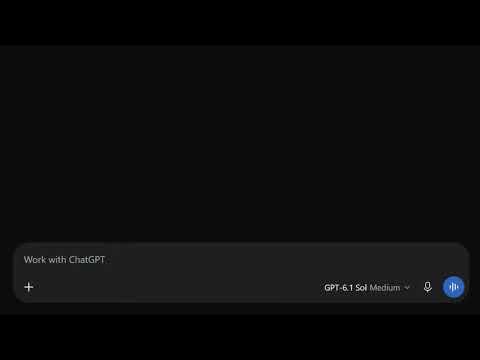
Introducing the Litera Plugin for ChatGPT and Copilot
The Litera Plugin for ChatGPT brings Litera’s comparison engine, refined over 30 years and more accurate than general-purpose LLMs, into the assistant your lawyers already use. The plugin also enables access to Firm AI Search and Litera’s pricing and finance tools, so your lawyers get insights across the practice and business of law without switching context.
Legal AI for Drafting
Find Your Best Language Without Leaving the Draft
Under deadline, lawyers reach for the precedent they remember, not the best work on file. Precedent in Word brings keyword, natural-language, and DMS document search together, so the best clauses and definitions from your iManage or NetDocuments documents appear alongside the curated content library, ranked by relevance and labeled by source.
Controlled Access for External Designers and Password-Free Sign-In
Administrators can grant fine-grained access to external template designers in the Create Desktop Application (CDA) and the Administrator Web application, while users sign in without a password. Security enhancements strengthen protection across all Create services.
Legal AI for Contract Review
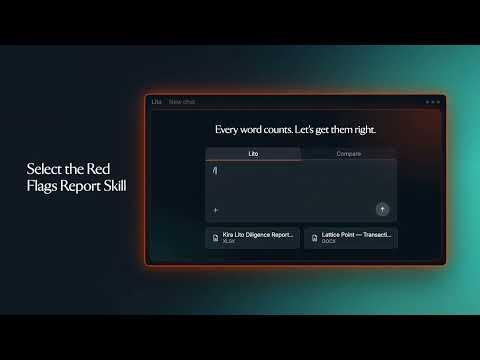
New Generative Smart Fields, a Lito Skill, and a Redesigned Kira
Three new generative smart field types (Yes/No, Multiple Choice, and Extraction) expand what Kira can surface from a project. A new Lito skill connects Kira to Lito to automate review workflows from data room to red flags report. And a redesigned Kira experience helps new and returning users find their way faster.
Legal AI for Redlines and Negotiation
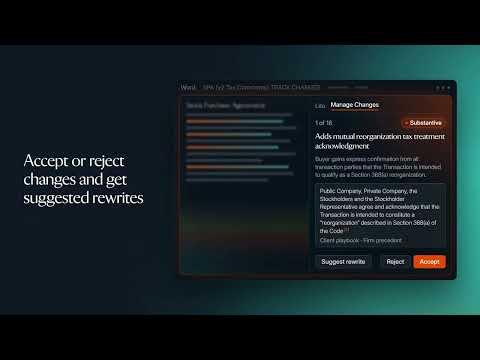
Every Tracked Change, Sorted and Explained Inside Word
Parsing dense markup, judging counterparty intent, and toggling between comparison tools and Word is slow, high-risk work. Manage Changes sorts every tracked change by substance, understands negotiation stance, and walks lawyers through each change with options to accept, reject, or revise. Actions run natively in the live document, so numbering and cross-references stay intact.
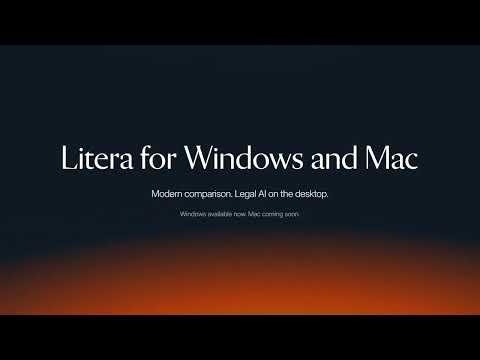
Comparison and Legal AI in Modern Windows and Mac Desktop Apps
Dedicated desktop apps bring Litera’s comparison engine and Lito, the Legal AI agent, to Windows and the Mac. Right-click shortcuts in Windows Explorer and Finder start a comparison or a chat without leaving your files, comparison output shares straight to Outlook, and automatic background updates keep every user current.
Deterministic Protection for Sensitive Documents
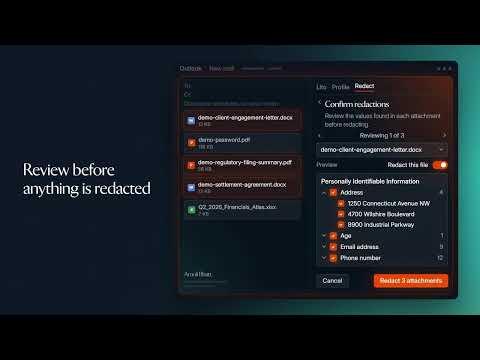
Redacted Before It Ever Leaves the Email
One missed account number in an attachment can undo the trust you’ve built. Redact scans Word and PDF attachments for names, dates, financial figures, and other sensitive data without leaving Outlook, using deterministic pattern- and dictionary-based detection rather than AI. Review findings category by category, then redact, and a locked, flattened PDF replaces the original attachment.
Clearer Metadata Control and Smarter Self-Send Safeguards
A redesigned Alerts dialog shows metadata actions at both the group and individual file level. New Self-Send SafeGuard controls, stronger email processing reliability, and a health check dashboard that reflects modern Microsoft Graph API environments round out the release.
Faster Binder Open and Load Times
Medium- to large-sized Binder projects open and load significantly faster, with fixes across annotations, link editing, iManage document preview, bookmarks, and digital signature certificate selection.
Legal AI for Transaction Management
A Redesigned Deal List and Room for Bigger Signings
A fully redesigned deal list puts critical deal information up front, enhanced status labels give owning organizations more control over how checklists are organized, and expanded signer capacity supports larger, more complex transactions. External users can now bulk download, and smarter daily digests keep teams aligned without the noise.
The Agent Fills Your Tables, With Your Sign-Off
Opened inside an existing matter, the Office & Dragons Agent now reads your table’s structure, extracts data points from uploaded documents, and populates the matching columns across Mass Editing, Document Generation, and Bulk Redaction. Nothing is written until you confirm, and anything it can’t match is flagged. The Agent is now out of beta, and administrators can turn off automatic field updates during generation.
Legal AI for Client Relationships
Know the Relationship Before You Walk In
Fee earners shouldn’t have to open another system to prepare for a client conversation. Lito now connects to Foundation 365, so lawyers, marketing teams, and support staff can ask about a client or matter in plain language and get relationships, interaction timelines, and matter details in moments. Lito respects each user’s existing Foundation 365 permissions, so data is still protected.
Need to request Lito for your firm? Reach out to your Litera representative, and our team can help you get started. Matter-level details also require Case and Matter Management.
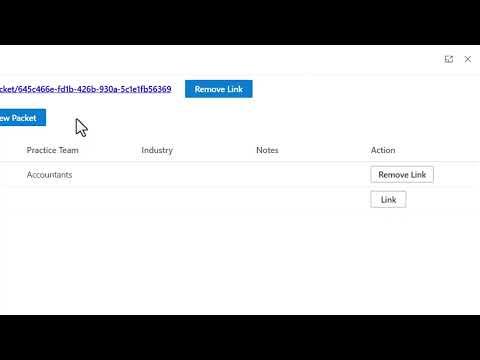
From Opportunity to Proposal Without the Handoff
Lawyers shouldn’t have to retype client details or hunt for past matters every time an opportunity needs a proposal. Foundation 365 now connects to Foundation, so lawyers can create a proposal packet, or link to an existing one, right from the opportunity. Foundation Experience brings in the matters your firm has already handled, and the packet links back to the opportunity.
Need this for your firm? Reach out to your Litera representative, and Professional Services can help you get started. This requires both Foundation 365 and Foundation.
Legal AI for Experience and Pitches
Your Best Experience Deserves a Wider Audience
Every pitch, proposal, and client conversation starts with the same question: what have we done in this area before? Foundation already has the answer, but not everyone who needs that knowledge works inside Foundation every day.
Firm AI Search eliminates that gap. Built on 30 years of legal-specific intelligence, it brings a natural-language layer to Foundation, so marketing and business development teams, attorneys, and knowledge leaders can query Foundation records and get cited answers sourced from their own Foundation data.
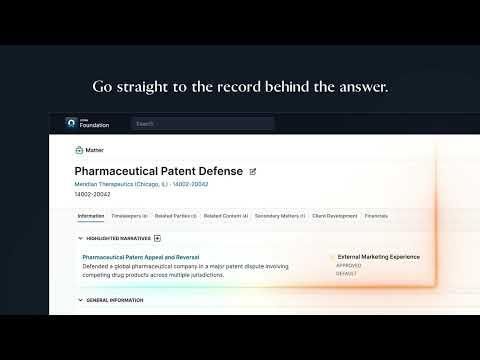
Foundation Firm AI Search Is Now in ChatGPT
Foundation Firm AI Search is now available in OpenAI for Law, bringing your firm’s intelligence directly into ChatGPT. Every answer is grounded in the Foundation records each user is permitted to access, keeping Foundation permissions intact.
Foundation Cloud users can ask ChatGPT strategic questions in natural language about what the firm knows across matters, clients, people, narratives, content, packets, and contacts, so the most relevant experience and relationships are there when they’re needed.
Marketing Engagement Connected to Time and Matters
Time Recording Connected to Marketing Activity
Deeper CX365 integration syncs time activity types, time capture records, and marketing entities such as opportunities, leads, and campaigns. Users can record time directly from matter and opportunity forms, and all integration passwords are now stored encrypted.
Legal AI for Pricing and Financial Insight
Is This Matter on Budget? Just Ask Lito.
Partners and pricing teams shouldn’t have to open a report and hunt for the right matter just to learn whether work is on budget. With Lito connected to Foundation Scoping, they can ask where a budget stands, how spend breaks down by category, and what work has fallen outside the agreed scope, all in plain language. Foundation Scoping draws on timecard narratives to show the work behind the numbers, and Lito guides you to the right answer, partnering with you every step of the way.
Available to Foundation Scoping customers on the Cloud through Litera Platform. Lito access is set up with Litera Professional Services.
Ask in Plain Language, Act on What Matters
Partners have plenty on their plate, and the most valuable financial insight is knowing where to look first. With Lito connected to Foundation Finance, users can skip the dashboard hunt and ask their questions in plain language. Lito answers with a narrative and the supporting data, then points to the insights and concerns most worth their attention, all drawn from the same source data the Foundation Finance application uses, in the firm’s own instance.
Available to Foundation Finance customers on the Cloud through Litera Platform, on version R6.3.14. Lito access is set up with our team.
Records, Talent, and Data Governance
Retention Schedule Endpoints and iManage Cloud Connectivity
New retention schedule endpoints help partner integrations automate records classification, alongside enhanced iManage Cloud connectivity, simpler Elasticsearch configuration without manual restarts, and security hardening across the platform.
A New Appraisal Form Experience and Guided Bulk Import
Administrators build and configure review forms in a tabbed layout with streamlined section management, and a guided CSV bulk import workflow handles upload, validation, and execution for large-scale user management.
Faster, More Flexible Search and Export for Migrations
Multi-library workspace search, document export by ID list, inline search in the export editor, paginated file grids, and real-time progress tracking make complex migration jobs easier to build and monitor.
Litera Platform and Lito: Unifying the Practice and Business of Law
Lito Projects and Dictation Come to Word
Lito Projects, already available in Litera Web, now organize AI-assisted work directly inside Litera for Word, and speech-to-text dictation makes it possible to work with Lito hands-free.
Configurable Retention Policies for Chats and Projects
Administrators set retention policies for Lito chats and projects directly from the Admin Center, with reliability fixes for Lito Inbox, email delivery, and knowledge extraction.
A Fuller Audit Trail and Simpler Okta Onboarding
Every Mail Monitoring health check is now recorded in the Admin Center Activity Log, and streamlined SCIM token copying makes Okta onboarding smoother.
Stay On the Record
Four times a year, the enhancements that matter most across the practice and business of law, and what each one means for your matters, your relationships, and your growth.
This is how lawyers Raise The Bar™.
Frequently Asked Questions About Legal AI
Legal AI is artificial intelligence built for the work of lawyers and legal teams, such as drafting, contract review, redlining, and matter management. Purpose-built Legal AI differs from general-purpose AI because high-stakes legal work demands outputs lawyers can verify. Litera pairs deterministic, rules-based engines refined over 30 years with the latest GenAI, so precision-critical tasks like document comparison stay exact while drafting and analysis move faster.
General-purpose AI produces probabilistic answers that are often mostly right, and high-stakes legal work can’t be mostly right. Litera’s proprietary redline algorithm is 100% more accurate than general-purpose LLMs, and Litera uses deterministic engines wherever precision must be proven, such as document comparison and redaction.
Litera brings Legal AI into Microsoft Word through Litera for Word. Lito works in the Word task pane, Manage Changes sorts and explains tracked changes directly in the document, and Precedent AI Global searches clauses and definitions from your DMS without leaving the draft. No new platforms or logins are required.
Start with accuracy, workflow fit, and security. Look for a platform that uses deterministic engines where precision must be proven, works inside the tools lawyers already use, and holds enterprise certifications such as ISO 27001 and SOC 2 Type 2. Then measure return on AI (RoAI) across time saved, deeper client relationships, and new business, not efficiency alone.
Yes. Litera serves corporate legal departments as well as law firms and is trusted by 71% of the Fortune 100. In-house legal teams use Litera for Word, Litera for Outlook, and Lito inside Microsoft 365 to practice smarter, manage more work in-house, and protect the business.
On the Record is a quarterly briefing from Litera. Each edition highlights the Legal AI and legal technology enhancements released across the practice and business of law, explains what each one means for your work, and links to the documentation you need to get started.
This edition highlights key releases from the 125 Litera shipped between Aug. 1 and Nov. 1, 2026, organized by the 10 capabilities Litera delivers across the practice and business of law. For every release note, visit the Litera Customer Center.
Every release on this page links to its release notes in the Litera Customer Center, where you’ll find availability, requirements, and setup guidance. Your Litera account team can also walk you through what’s included in your current licenses.
Subscribe to On the Record and each new edition arrives in your inbox shortly after the quarter closes. Four emails a year, and you can unsubscribe anytime.