The Best Way to Combine PDF Files into a Court Book

If you’re a lawyer or legal secretary, chances are you already know the requirements of a Court Book since it is so crucial to the job.
If your memory needs a refresher, or if you’ve just taken on the responsibility of preparing them, a Court Book is defined by the Federal Court of Australia as “an indexed collection of Documents to be relied upon at the hearing of a matter.”
An electronic Court Book is one in which “the Documents are stored and managed electronically.” There are specific requirements for how an electronic Court Book is indexed, searched, referenced, and displayed throughout the hearing. For example, Court Books usually require Optical Character Recognition (OCR) processing to be fully text searchable.
What’s involved in creating a Court Book?
The documents that need to be included in a Court Book can number in the hundreds or even the thousands by the time of the hearing. Even after the job of combining them is done, these documents needed to be placed in chronological order and correctly indexed.
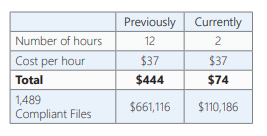
At one Australian regulatory body in the legal services industry, creating a single Court Book was taking up to 12 hours. Hundreds of documents, including affidavits, evidence, and pleadings, needed to be combined into one PDF.
As an example of the scale of work involved, 1,489 Compliant Files were opened over a 12-month period.
The parts of Court Book creation that can be automated
A PDF binder application can automate the job of assembling and converting many documents into one. It can quickly generate and add a Table of Contents or apply corporate stationery to the entire document.
Small but important tasks like generating hyperlinks and bookmarks can also be automated with an electronic binder application. Users can apply page numbering, date and time stamps, or add document metadata like the author or Doc ID into the headers or footers.
By automating much of the work, a PDF binder application can reduce time spent creating Court Books by up to 75%.
For example, at the same regulatory body, staff used a PDF binder application to create a Court Book consisting of 122 charges, over 5,000 pages, complete with a Table of Contents and cover page in a fraction of the time it used to take.
The regulatory body uses its binder application to do more than just create Court Books. It uses the encryption capability to stop users from modifying document contents and the redaction tool to properly remove sensitive information before filing.
Take the time out of Court Book creation and put the focus back on higher-value work. Start using a PDF binder application to automate much of the small but important parts of a Court Book, and you'll save hours.


